Data Acquisition via Web Scraping
DSCI 200
Katie Burak, Gabriela V. Cohen Freue
Last modified – 13 March 2026
\[ \DeclareMathOperator*{\argmin}{argmin} \DeclareMathOperator*{\argmax}{argmax} \DeclareMathOperator*{\minimize}{minimize} \DeclareMathOperator*{\maximize}{maximize} \DeclareMathOperator*{\find}{find} \DeclareMathOperator{\st}{subject\,\,to} \newcommand{\E}{E} \newcommand{\Expect}[1]{\E\left[ #1 \right]} \newcommand{\Var}[1]{\mathrm{Var}\left[ #1 \right]} \newcommand{\Cov}[2]{\mathrm{Cov}\left[#1,\ #2\right]} \newcommand{\given}{\ \vert\ } \newcommand{\X}{\mathbf{X}} \newcommand{\x}{\mathbf{x}} \newcommand{\y}{\mathbf{y}} \newcommand{\P}{\mathcal{P}} \newcommand{\R}{\mathbb{R}} \newcommand{\norm}[1]{\left\lVert #1 \right\rVert} \newcommand{\snorm}[1]{\lVert #1 \rVert} \newcommand{\tr}[1]{\mbox{tr}(#1)} \newcommand{\brt}{\widehat{\beta}^R_{s}} \newcommand{\brl}{\widehat{\beta}^R_{\lambda}} \newcommand{\bls}{\widehat{\beta}_{ols}} \newcommand{\blt}{\widehat{\beta}^L_{s}} \newcommand{\bll}{\widehat{\beta}^L_{\lambda}} \newcommand{\U}{\mathbf{U}} \newcommand{\D}{\mathbf{D}} \newcommand{\V}{\mathbf{V}} \]
Attribution
This material is adapted from the following sources:
- R for Data Science (2e): Chapter 24 - Web Scraping
- STA 199: Introduction to Data Science and Statistical Thinking, Mine Çetinkaya-Rundel, Duke University.
- Dogucu, M., & Çetinkaya-Rundel, M. (2020). Web Scraping in the Statistics and Data Science Curriculum: Challenges and Opportunities. Journal of Statistics and Data Science Education, 29(sup1), S112–S122. https://doi.org/10.1080/10691898.2020.1787116
Web Scraping
- Web scraping is a powerful tool for extracting data from web pages.
- As we discussed previously, some websites provide APIs, in which case they should be used as the data obtained is likely more reliable.
- However, web scraping is useful when no API is available.
Learning Objectives
By the end of today’s lesson, you should be able to:
- Explain the ethics and legal considerations of web scraping.
- Identify CSS selectors to locate specific elements on a web page.
- Utilize the
rvestpackage to extract data from text and HTML attributes into R.
- Determine and test the appropriate CSS selector needed for scraping a given web page.
Packages
- We’ll use the
rvestpackage, part of thetidyverse(but not core). - We will also use the
robotstxtpackage to verify whether we can scrape data from a particular url.

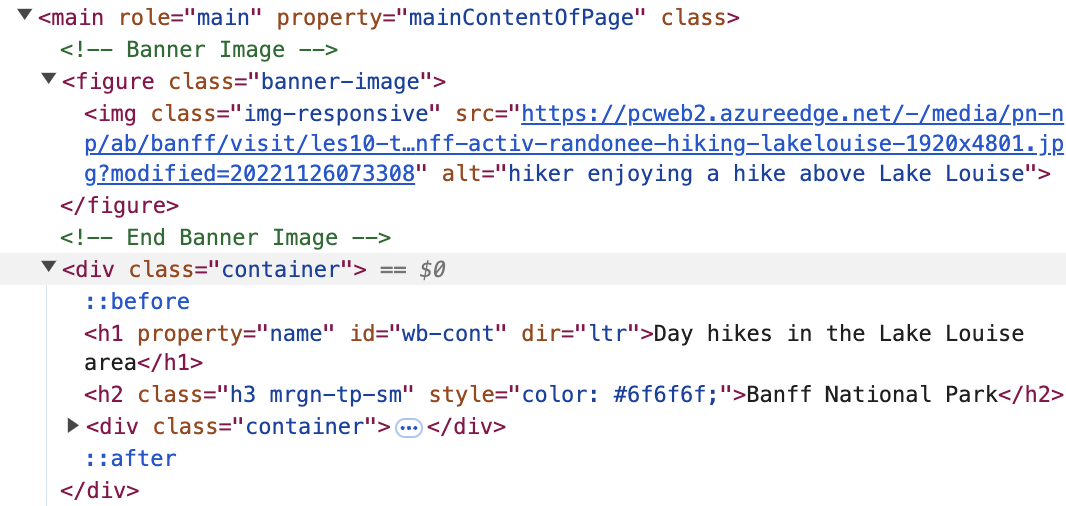
Many websites present their content (including data) using HyperText Markup Language (HTML).
Introduction to HTML
- Web scraping requires a basic understanding of HTML, which structures web pages.
- Example of a simple HTML structure:
<html>
  <head>
    <meta charset="UTF-8">
    <title>Sample Webpage</title>
  </head>
  <body>
    <h2 class="main-title">Welcome to My Site!</h2>
    <p>Here is some sample text with <em>emphasis</em> included.</p>
    <img src="sample-image.png" alt="A descriptive image" width="200">
  </body>
</html>- While this course doesn’t aim to teach HTML in depth, having a basic understanding is useful for getting started with web scraping.
HTML Structure
- HTML consists of elements with:
- Start tag (e.g.,
<p>) - Content (text or other elements)
- End tag (e.g.,
</p>)
- Start tag (e.g.,
- Some tags can contain other elements, forming a hierarchical structure.
Essential HTML Elements
Document Structure
<html>: The root element.
<head>: Metadata like title and styles.
<body>: The visible content.
Block Elements
<h1>- Headings
<p>- Paragraphs
<section>- Sections
<ol>- Ordered lists
Inline Elements
<b>- Bold
<i>- Italics
<a>- Links
Understanding HTML Elements
- Elements may contain child elements.
- Example:
- Here,
<p>is the parent,<b>is the child - Note that
<b>has no children, but it has the content “name”
HTML Attributes
Attributes provide extra information about elements.
Example syntax:
<a>is the tag (HTML element) for a link.href is the attribute of the
<a>tag, which specifies the URL the link points to.“https://ubc-stat.github.io/dsci-200/” is the value of the href attribute, indicating the destination of the link.
Click hereis the content inside the tag, which the user will see and click.
Important attributes
- id: Unique identifier (e.g.,
id='header') - class: Categorizes elements (e.g.,
class='nav-item') - href: Specifies link destinations (
<a href='example.com'>) - src: Image sources (
<img src='photo.jpg'>)
id and class are used with CSS (Cascading Style Sheets) to control the appearance of a page and are often useful when web scraping data!
Important rvest functions
read_html(): Loads HTML content from a webpage URL or a character string.html_element(): Retrieve a single matching element based on a CSS selector.html_elements(): Retrieves all matching elements using CSS selectors.html_table(): Converts HTML tables into data frames.html_text()/html_text2(): Gets the text content from within HTML tags.html_name(): Returns the tag name(s) of HTML elements.html_attr(): Retrieves a single attribute.html_attrs(): Retrieves all attributes.
Sample HTML
html <-
'<html>
  <head>
    <title>Sample Webpage</title>
  </head>
  <body>
    <h2 class="sub-title">Welcome to My Site!</h2>
    <p>Here is some sample text.</p>
    <p> Some useful information... </p>
    <img src="sample-image.png" alt="A descriptive image" width="200">
  </body>
</html>'

read_html(html)
{html_document}
<html>
[1] <head>\n<meta http-equiv="Content-Type" content="text/html; charset=UTF-8 ...
[2] <body>\n <h2 class="sub-title">Welcome to My Site!</h2>\n <p>Here i ...Selecting elements
html_element()always returns the same number of outputs as inputs. If you apply it to a whole document it’ll give you the first match:
Extracting Text & Attributes
- Use
html_text()orhtml_text2()to get text content:
- The main difference in these functions is how they treat whitespace/formatting.
html_text()returns the raw text andhtml_text2()tries to return text as it would appear in a web browser. For example:
- You can use
html_attr()to extract attributes like links:
Nesting Selections
- In most cases, you’ll use
html_elements()andhtml_element()together.
- Typically,
html_elements()identifies elements that will become observations, andhtml_element()extracts variables from those elements. Here’s an example using a simple HTML list of coffee shops around UBC:
html <- read_html("
  <ul>
    <li><b>Loafe Cafe</b> serves <i>coffee and pastries</i> and has <span class='seating'>indoor & outdoor seating</span></li>
    <li><b>Bean Around the World</b> serves <i>great coffee</i></li>
    <li><b>JJ Bean</b> serves <i>strong espresso</i> and has <span class='seating'>cozy indoor seating</span></li>
    <li><b>The Great Dane</b> has <span class='seating'>a dog-friendly patio</span></li>
  </ul>
  ")
Extracting Coffee Shop Names
We use html_elements("li") to create an object of class xml_nodeset where each element represents a different coffee shop:
{xml_nodeset (4)}
[1] <li>\n<b>Loafe Cafe</b> serves <i>coffee and pastries</i> and has <span c ...
[2] <li>\n<b>Bean Around the World</b> serves <i>great coffee</i>\n</li>
[3] <li>\n<b>JJ Bean</b> serves <i>strong espresso</i> and has <span class="s ...
[4] <li>\n<b>The Great Dane</b> has <span class="seating">a dog-friendly pati ...
To extract the name of each shop, we use html_element("b"):
Extracting Seating Information
Suppose we want one seating description for each shop, even if some don’t have seating information.
What if we used html_elements(".seating")?
{xml_nodeset (3)}
[1] <span class="seating">indoor & outdoor seating</span>
[2] <span class="seating">cozy indoor seating</span>
[3] <span class="seating">a dog-friendly patio</span>
html_element()returns one result per input node, whereashtml_elements()returns all matches (dropping missing ones)
HTML Tables
HTML tables are often used to store tabular data on web pages and you can easily extract it. Key HTML table elements:
<table>: Defines the table.<tr>: Table row.<th>: Table heading.<td>: Table data.
Example of an HTML Table
Here’s a simple HTML table with two columns and three rows:
Extracting Tables
- You can use the
rvestpackage to extract tables from HTML pages:
# A tibble: 3 × 2
      x     y
  <dbl> <dbl>
1   1.5   2.7
2   4.9   1.3
3   7.2   8.1
The
html_table()function automatically converts values like “x” and “y” to numbers.If you want to prevent this automatic conversion and handle it yourself, use the
convert = FALSEargument.
CSS Selectors
CSS (Cascading Style Sheets) helps define page structure and styling. To extract elements efficiently, we use selectors such as:
p→ selects all<p>elements.title→ selects elements with class “title”#title→ selects element with ID “title”
Finding the right CSS selector is typically the hardest part of web scraping. This is because you want a selector that is specific enough that you aren’t capturing unnecessary information, but you also don’t want your scope to be too narrow such that you miss important information.
SelectorGadget
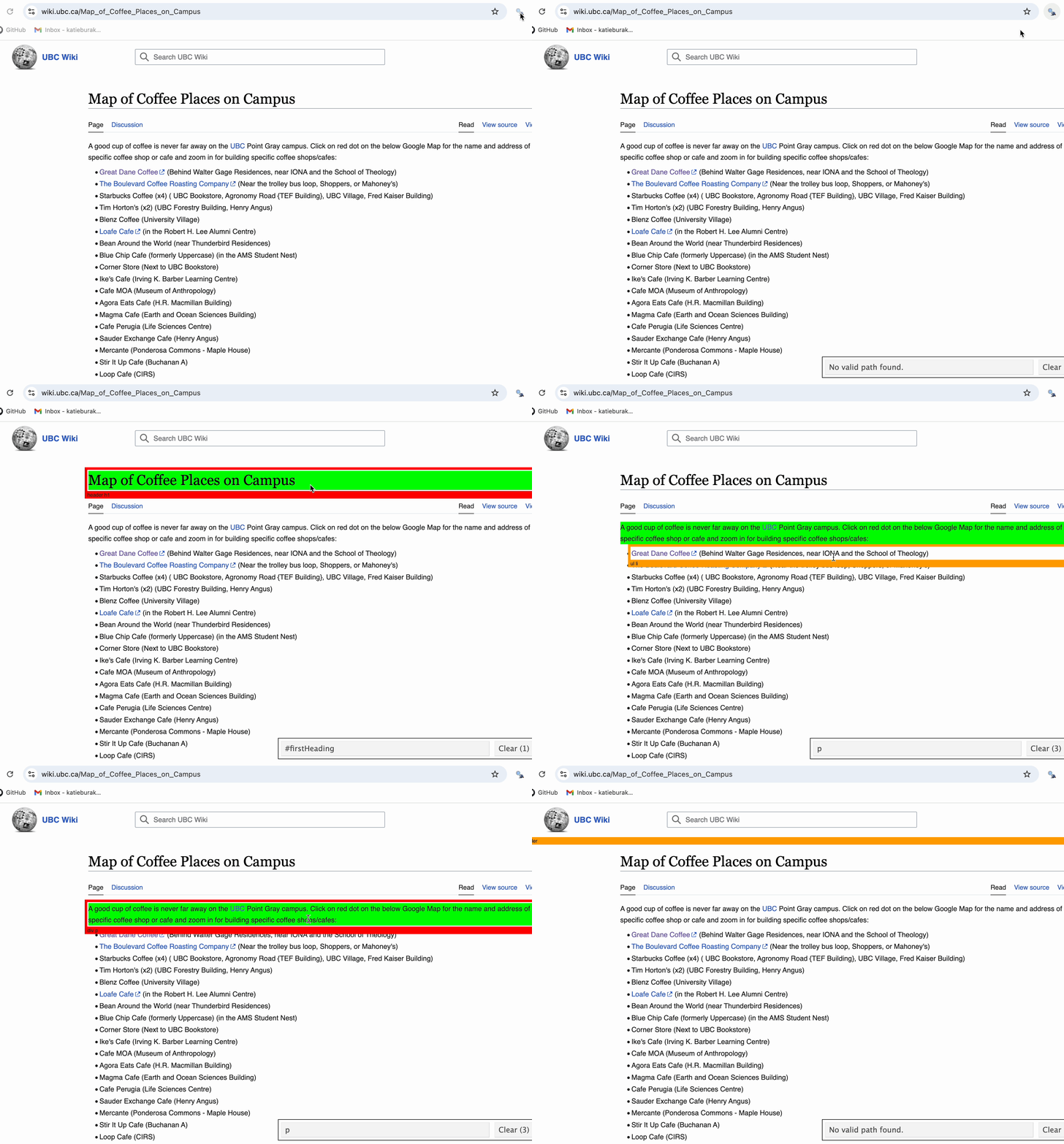
Instead of inspecting raw HTML code to find the right CSS selector, we are going to use a tool called SelectorGadget.
SelectorGadget works best with Chrome browsers. If you haven’t done so already, install the Chrome extension here.
Once added, the icon should appear to the right of the search bar.

In-class Exercise
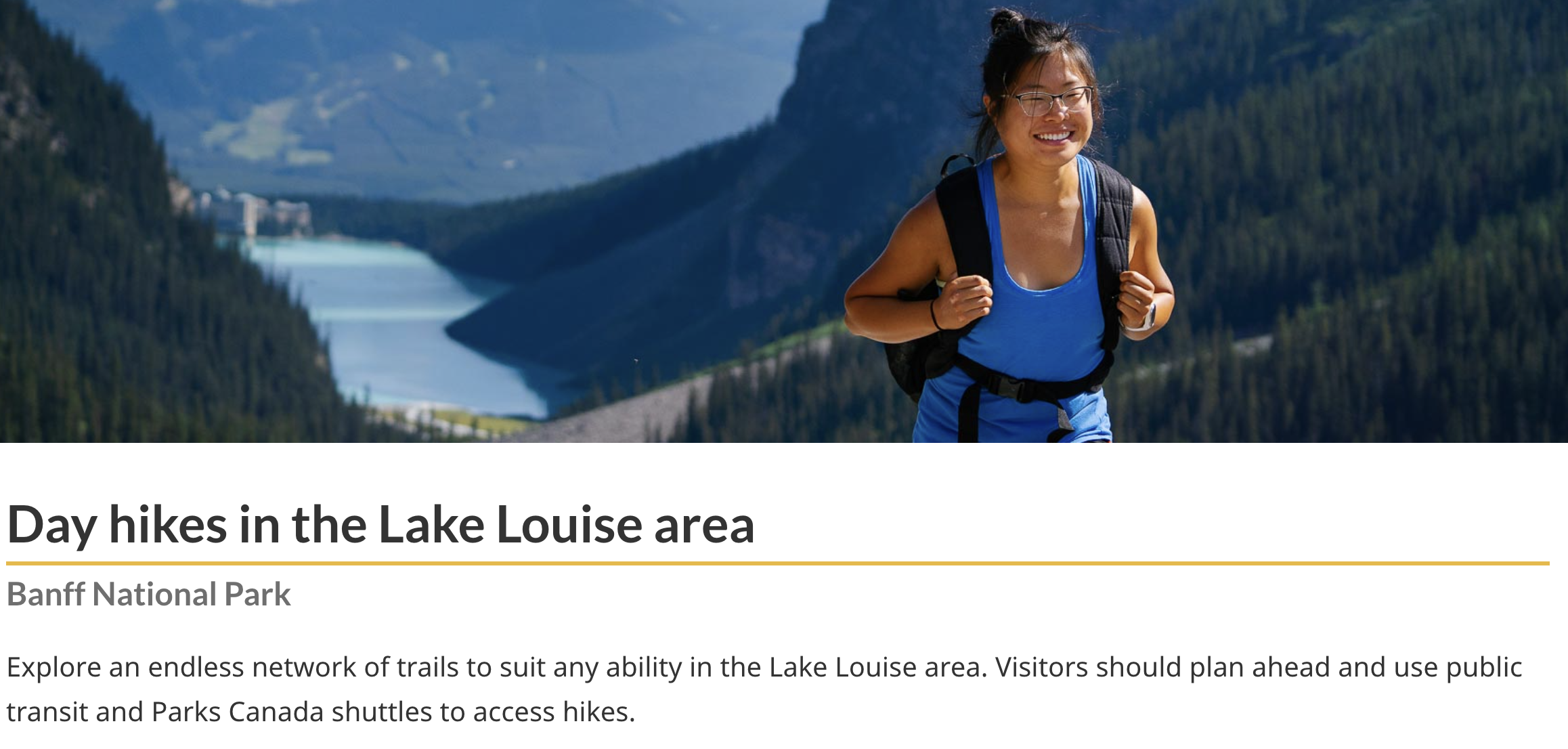
You’re planning an adventurous getaway to the stunning wilderness of Lake Louise in Banff National Park, Alberta. To make the most of your trip, you want to gather up-to-date information on the best hiking trails in the area with details like trail distance and elevation gain.
In this exercise, you’ll explore a real-world data collection task by scraping hiking trail information from Parks Canada.
The Data
- Let’s explore the Park’s Canada website that contains information about day hikes in the Lake Louise area:
https://parks.canada.ca/pn-np/ab/banff/activ/randonnee-hiking/lakelouise
- We first need to verify that this website can be scraped (note this is very different than whether the website should be scraped from an ethical or legal perspective).
- To do this, we can use the
paths_allowed()function from therobotstxtpackage. This function checks if a bot has permissions to access page(s) and returnsTRUEif allowed based on the site’srobots.txtfile.
Load and Read HTML Page
- First, use
rvestto read HTML content from Parks Canada site (https://parks.canada.ca/pn-np/ab/banff/activ/randonnee-hiking/lakelouise)
{html_document}
<html class="no-js" lang="en" dir="ltr">
[1] <head>\n<meta http-equiv="Content-Type" content="text/html; charset=UTF-8 ...
[2] <body class="" vocab="http://schema.org/" typeof="WebPage">\r\n    \r\n\r ...
Extract Trail Information
- Now, use SelectorGadget to obtain the CSS selectors to locate the trail names, the distance and elevation gain.
Create a data frame
# A tibble: 6 × 3
  trail                  distance     elevation
  <chr>                  <chr>        <chr>
1 Lake Louise Lakeshore  2.3 km       minimal
2 Fairview Lookout       1.2 km       100 m
3 Bow River              Up to 5.7 km minimal
4  Rockpile              0.7 km loop  35 m
5 Moraine Lake Lakeshore 1.3 km       minimal
6 Consolation Lakes      2.9 km       135 m
Clean data
- GOALS:
- Extract numeric values from text fields
- Handle values of “minimal” for elevation
- Convert distances to numeric (in km) in a consistent format
- To achieve these goals, we need to do some string manipulation using the
stringrpackage. This is not a specific learning objective of this course, but some string manipulation may be needed depending on the data. Please consult your instructor or a TA for any additional guidance on working with strings and regular expressions in R.
library(stringr)

hikes_clean <- hikes_raw |>
  mutate(
    distance_km = str_extract(distance, "\\d+(\\.\\d+)?") |> as.numeric(),
    elevation_m = case_when(
      str_detect(elevation, "minimal") ~ 0,
      TRUE ~ str_extract(elevation, "\\d+") |> as.numeric()
    )
  ) |>
  select(-distance, -elevation)

head(hikes_clean)
# A tibble: 6 × 3
trail distance_km elevation_m
<chr> <dbl> <dbl>
1 Lake Louise Lakeshore 2.3 0
2 Fairview Lookout 1.2 100
3 Bow River 5.7 0
4 Rockpile 0.7 35
5 Moraine Lake Lakeshore 1.3 0
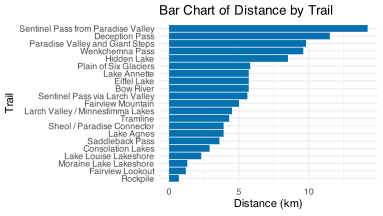
6 Consolation Lakes 2.9 135Now that the data is in a tidy format, we are free to explore! What are some of the longest day hikes in the Lake Louise area?
A Note about Workflows
- When working in a Jupyter notebook, everytime we click “Restart and Run All Cells” our entire analysis is rerun.
- If we are web scraping, this means that each time we run our notebook we will be scraping new data, which isn’t ideal since:
- the data could have changed since the first time we wrote our analysis (not good for reproducibility)
- it puts additional strain on the particular web server
- A suggested workflow is to use a script to save your code, save your scraped data as a CSV using
write_csv()and use the saved data in your analysis.
Scraping Ethics
Web scraping has both ethical and legal considerations, which can vary depending on your location.
We will discuss data ownership in more detail later in the course, but for now we will discuss some general guidelines.
Note: While we are providing general guidelines and best practices for web scraping, please note that we are not lawyers. If you are unsure about the legal or ethical implications of a specific scraping project, you should consult a qualified legal professional. Always prioritize respecting website terms, data privacy, and intellectual property rights.
Scraping Ethics
General Guidelines:
- Data should be public, non-personal, and factual to minimize legal risks.
- Avoid scraping to profit from the data unless legally cleared.
- Be respectful of server resources by pausing between requests.
- If unsure, consult a legal professional.
Terms of Service
- Many websites have “Terms of Service” that often prohibit scraping.
- Key points to consider:
- In the US, you are generally not bound by terms of service unless you explicitly agree (e.g., by creating an account or checking a box).
- In Europe, terms of service may be enforceable even without explicit agreement.
- Respect these terms where possible but know they may not always be legally binding.
- In the US, you are generally not bound by terms of service unless you explicitly agree (e.g., by creating an account or checking a box).
In-Class Exercise: Reviewing Terms of Service
In this exercise, we’ll explore the Terms of Service on a website. Your task:
- Visit a website of your choice (you could use the Parks Canada website).
- Look for the “Terms of Service” or “Terms and Conditions” link (often found in the footer).
- Check if there are any explicit mentions of scraping or data usage.
- Discuss the terms with the people around you. Try and answer the following questions:
- Is web scraping prohibited?
- Are there any clauses about data usage or copyright?
- Is web scraping prohibited?
We will share our findings and discuss how these terms might affect web scraping.
In-Class Exercise: Reviewing Terms of Service
As a class, let’s take a look at Spotify’s User Guidelines.

Personally Identifiable Information
- Avoid scraping personally identifiable information such as names, emails, phone numbers, or birthdays.
- Releasing public but identifiable information can cause harm.
- For example, you can read about the legal battle of hiQ vs. LinkedIn, in which hiQ Labs used web scraping to collect public data from LinkedIn profiles.
Key Takeaways
- Recognizing legal and ethical considerations are critical when scraping data from the web
- Implementing the
rvestpackage for scraping and parsing HTML content
- Understanding the purpose of HTML and CSS selectors when extracting data from web pages
- Just because a website can be scraped, doesn’t mean we should!
UBC DSCI 200