Before jumping into analysis or building models, we need to understand the data. This is where exploratory data analysis (EDA) comes in.
EDA is not a strict process. Instead, it’s a flexible and creative cycle where you:
Come up with questions about the data
Investigate possible answers using visualizations, transformations, and simple models
Let the answers inspire new or refined questions
Eventually, you’ll land on insights that are worth digging into and sharing
EDA
Even if you’re given a clear research question, EDA still plays a key role. It’s how we check data quality, spot inconsistencies, and detect patterns. For example,
Are there missing values?
Do variables have unexpected distributions?
Are there data points that don’t belong?
All of these questions fall under the umbrella of EDA!
Learning Objectives
By the end of this lesson, you will be able to:
Explain the purpose and importance of exploratory data analysis (EDA).
Evaluate appropriate statistical measures for central tendency and variability.
Select suitable visualizations for different variable types and communication goals.
Use computer code to effectively visualize data, including understanding how different layers can be utilized to improve a visualization.
Critique visualizations to identify and suggest improvements.
Data Visualization
Data visualization is an important part of EDA.
Let’s start by reviewing some of the plots we introduced in DSCI 100, as well as introducing some new ones!
Visualizing Numerical Variables
Thinking back to DSCI 100, what are some examples of plots that can be useful to visualize numerical/quantitative variables?
Histograms
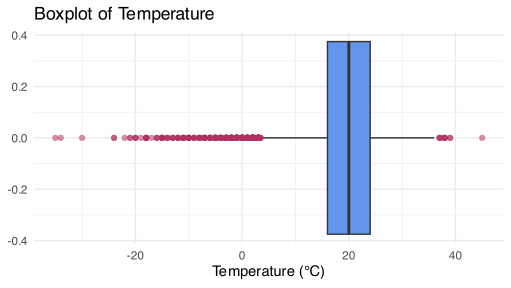
Boxplots
Line plots
Jitter plots (new)
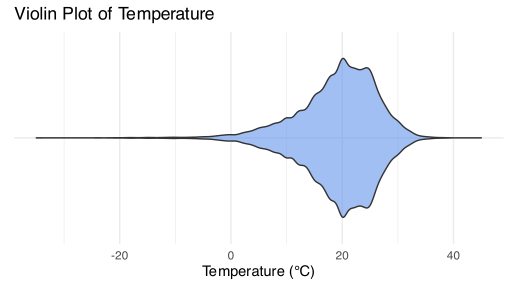
Violin plots (new)
Loading the Data
We will be looking at historical data on Alberta’s wildfires. This data set can be found on the Diverse Data Hub, a resource designed to promote the use of data focused on socially relevant topics.
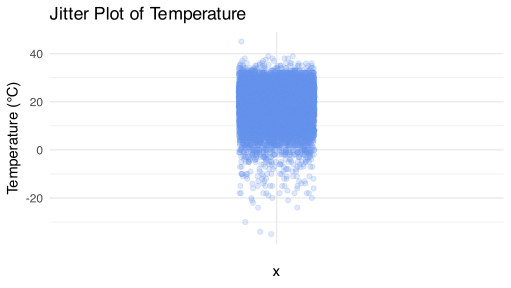
Jitter plots are another way to visualize a numerical variable.
You can play around with the width and transparency (alpha) to make the plot more readable and avoid too much overlap.
As you will see, it’s not particularly suitable when you have a large number of observations.
wildfire |>ggplot(aes(x ="", y = temperature)) +geom_jitter(width =0.1, alpha =0.2, color ="cornflowerblue") +labs(title ="Jitter Plot of Temperature",y ="Temperature (°C)" ) +theme_minimal()
Histogram
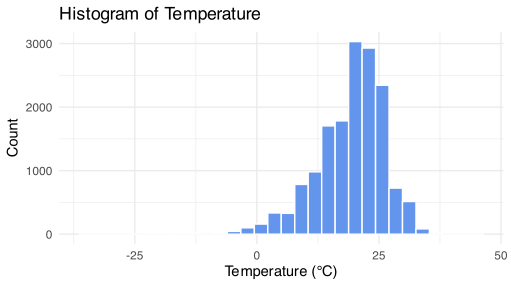
Histograms also show the distribution of a quantitative variable.
wildfire |>ggplot(aes(x = temperature)) +geom_histogram(bins =30, fill ="cornflowerblue", color ="white") +labs(title ="Histogram of Temperature",x ="Temperature (°C)",y ="Count" ) +theme_minimal()
Line plots
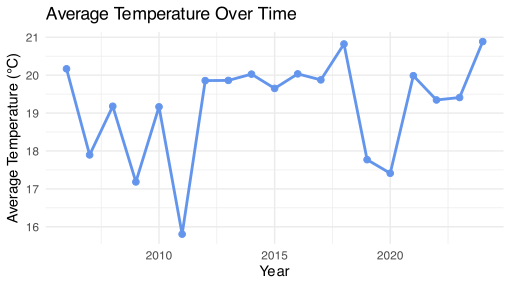
Line plots help us visualize a quantity over time.
wildfire |>group_by(year) |>summarise(avg_temperature =mean(temperature, na.rm =TRUE)) |>ggplot(aes(x = year, y = avg_temperature)) +geom_line(color ="cornflowerblue", linewidth =1) +geom_point(color ="cornflowerblue", size =2) +labs(title ="Average Temperature Over Time",x ="Year",y ="Average Temperature (°C)" ) +theme_minimal()
Visualizing Categorical Data
What is a plot we can use to visualize a categorical variable?
Bar plots
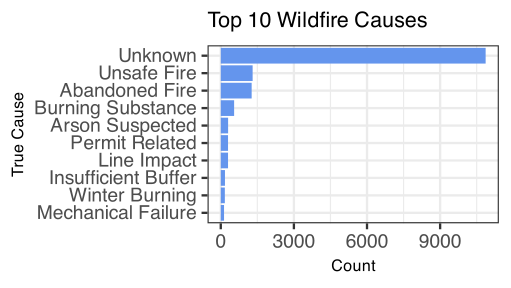
Bar plots
true_cause_summary <- wildfire |>count(true_cause, sort =TRUE) |>slice_max(n, n =10)barplot <-ggplot(true_cause_summary,aes(x = n,y =fct_reorder(true_cause, n))) +geom_bar(stat ="identity", fill ="cornflowerblue") +labs(x ="Count", y ="True Cause", title ="Top 10 Wildfire Causes") +theme(plot.title =element_text(size =16),axis.title.x =element_text(size =12),axis.title.y =element_text(size =12) )
barplot
Asking Questions
Now that we have reviewed some common plots, let’s get back to the why.
EDA is driven by questions. Each one shines a light on a different part of the dataset.
The goal isn’t to answer every question, but to use them to guide exploration.
Here are some examples:
What does this variable look like?
How does it relate to other variables?
Are there unusual values?
What patterns emerge over time or across groups?
You don’t need the perfect question at the start! Often, you won’t know what to ask until you’ve seen the data…
Start with broad questions
Let early insights shape new, more specific ones
Dig deeper with each iteration
Types of Questions
Although there are many types of exploratory questions, we will focus on the following three questions:
What is the central tendency of my variable(s)?
What type of variation occurs within my variables?
What type of covariation occurs between my variables?
Measures of Central Tendency
When we want to summarize a numeric variable with a single value, we often report a measure of central tendency.
Common measures include the mean, median and mode.
These help answer questions like:
What’s typical?
What’s average?
What’s most common?
The Mean
The mean is what most people think of as “the average”.
The sample mean is denoted as \(\bar{x}\) and is calculated by adding up all the values and dividing by how many there are.
\[\bar{x} = \sum_{i=1}^n \frac{x_i}{n},\] where \(x_i\) are the observed values and \(n\) is the sample size.
The Median
The median is the middle observation in the data when all values are sorted from smallest to largest.
50% of the data will be above and below the median.
For an odd number of observations, order them and take the middle value. \[
\{3, 4, {\color{blue}6}, 7, 10\} \rightarrow \text{median} = {\color{blue}6}
\]
For an even number of observations, order them and average the two middle values. \[
\{3, 4, {\color{blue}6}, {\color{blue}7}, 10, 12\} \rightarrow \text{median}=\frac{6+7}{2}=6.5
\]
Discussion
When reporting household earnings in Vancouver, what measure of center would you choose and why?
Take 1-2 minutes to discuss this question with your neighbours and be prepared to discuss as a class!
Mean vs. Median
The mean can be sensitive to skewness and extreme values (outliers) - much more to come later in this course about working with outliers!
The median is more robust (less affected) by skewness and outliers in the data.
When the data is roughly symmetric with few outliers, the mean and median will be very close.
However, in the presence of outliers or skewness, the median may be preferred.
Example
a <-c(5,5,6,5.5,4,6)b <-c(5,5,6,5.5,4,6,20)results <-tibble(Vector =c("a", "b"),Mean =c(mean(a), mean(b)),Median =c(median(a), median(b)))print(results)
# A tibble: 2 × 3
  Vector  Mean Median
  <chr>  <dbl>  <dbl>
1 a       5.25   5.25
2 b       7.36   5.5
iClicker question
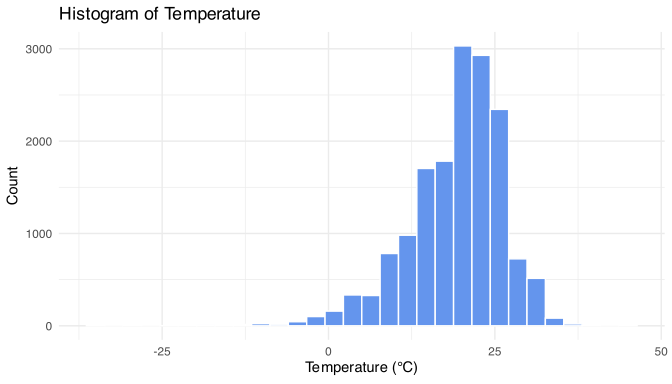
The following is a histogram of temperature. Which statement is true?
The mean and median are equal.
The mean will be greater than the median.
The median will be greater than the mean.
Not enough information to make any conclusion.
To verify this, let’s compute the mean and median temperature:
Why can the range be potentially misleading as a measure of variability?
It only considers the middle 50% of the data
It uses all data points equally
It is only influenced by the smallest and largest values
It accounts for how data is clustered around the mean
Covariation
Variation measures the variability within a variable.
Covariation measures the variation between two or more variables.
The way we measure or investigate covariation depends on the nature of the variables we are interested in, but a good start is to visualize the relationships!
Two categorical variables
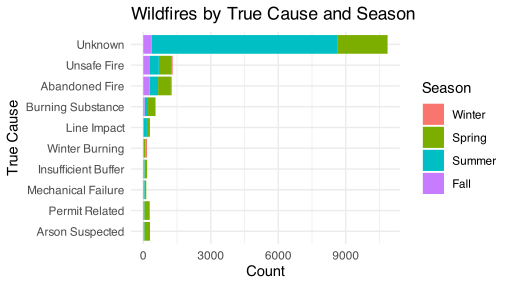
Suppose we wanted to investigate the top 10 causes of wildfires by season.
We will create a season variable and extract the top 10 causes and store it in a separate object:
# Create season variable based on fire_start_datewildfire_season <- wildfire |>mutate(month =month(fire_start_date),season =case_when( month %in%c(12, 1, 2) ~"Winter", month %in%3:5~"Spring", month %in%6:8~"Summer", month %in%9:11~"Fall" ),season =factor(season, levels =c("Winter", "Spring", "Summer", "Fall")) )top_10_causes <- wildfire |>count(true_cause, sort =TRUE) |>slice_max(n, n =10) |>pull(true_cause)
Contingency table
Contingency tables can help display infomration for two categorical variables. However, at times they can be difficult to digest and are often better represented visually.
Remember that we can stack bar plots so we can include another categorical variable in the visualization.
true_cause_season_counts <- wildfire_season |>filter(!is.na(season), true_cause %in% top_10_causes) |>count(true_cause, season)# Plot stacked bar chartstacked_bar <-ggplot(true_cause_season_counts,aes(x = n,y =fct_reorder(true_cause, n),fill = season)) +geom_bar(stat ="identity") +labs(title ="Wildfires by True Cause and Season",x ="Count",y ="True Cause",fill ="Season" ) +theme_minimal()
stacked_bar
Categorical & Numerical Variables
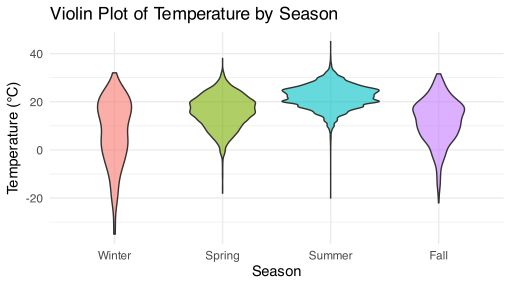
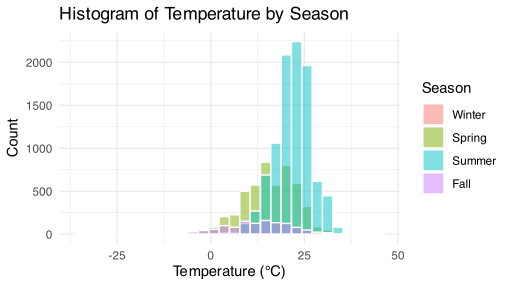
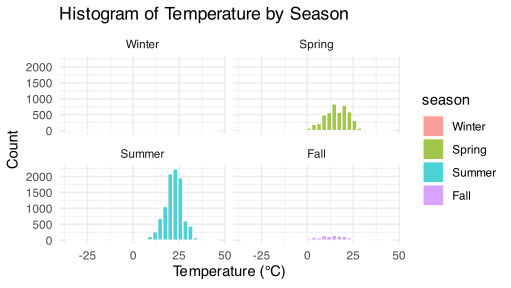
To look at the relationship between a categorical variable and a numerical variable, we can look at these plots of a numerical variable separated by each level of a categorical variable.
violin_plot2 <- wildfire_season |>filter(!is.na(season)) |>ggplot(aes(x = season, y = temperature, fill = season)) +geom_violin(alpha =0.6) +labs(title ="Violin Plot of Temperature by Season",y ="Temperature (°C)",x ="Season" ) +theme_minimal() +theme(legend.position ="none")
violin_plot2
wildfire_season |>filter(!is.na(season)) |>ggplot(aes(x = temperature, fill = season)) +geom_histogram(position ="identity", alpha =0.5, bins =30, color ="white") +labs(title ="Histogram of Temperature by Season",x ="Temperature (°C)",y ="Count",fill ="Season" ) +theme_minimal()
Remember the use of facet_wrap() can help make complex plots much easier to interpret by splitting the data into multiple panels.
wildfire_season |>filter(!is.na(season)) |>ggplot(aes(x = temperature, fill = season)) +geom_histogram(bins =30, color ="white", alpha =0.7) +facet_wrap(~ season) +labs(title ="Histogram of Temperature by Season",x ="Temperature (°C)",y ="Count" ) +theme_minimal()
Two numerical variables
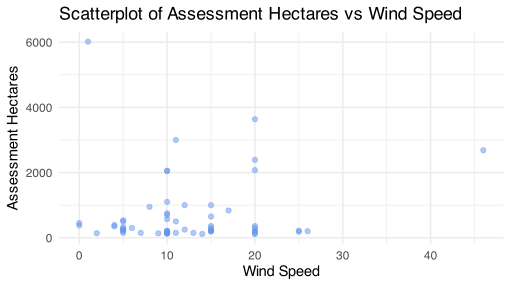
We can use a scatterplot to visualize the relationship between two numerical variables.
scatterplot <- wildfire |>filter(assessment_hectares >100)|>ggplot(aes(x = wind_speed, y = assessment_hectares)) +geom_point(alpha =0.5, color ="cornflowerblue") +labs(title ="Scatterplot of Assessment Hectares vs Wind Speed",x ="Wind Speed",y ="Assessment Hectares" ) +theme_minimal()
How would you describe the relationship between the wind speed and the size of the wildfire in terms of assessment hectares?
scatterplot
Next Class
We will introduce correlation as a way to quantify the relationship between two numerical variables.
Key Takeaways
EDA is a flexible, question-driven process to understand your data before modelling
Visualization helps reveal patterns, outliers and relationships
Choose appropriate plots based on variable types and what you’re trying to show
Use the right summary based on data shape and presence of outliers