Lecture 5: Version Control
DSCI 100
🏠 Housekeeping: Project
- If you completed your tutorials and worksheets in time but received a grade of 0 and believe this is an error, please email Julia at courses@stat.ubc.ca
- The course project starts this week!
- No tutorial assignment on version control this week.
- Instead, work on your project and complete up to Checkpoint A, and you must submit your repository URL to Canvas!
🏠 Housekeeping: Midterm
Important
- Bring a laptop. The Lockdown Browser does not work on an iPad or phone.
- Bring your UBC ID card, we will check it during the midterm.
- No AI-glasses or any camera, microphone, recording or communication devices allowed!
- Midterm is 2 weeks from now, during your own tutorial time slot, starting at the beginning of the tutorial period.
- Closed book quiz on Canvas.
- You get a reference sheet of R functions. Practise with it now, so you know where everything is.
- You need to install the Lockdown Browser. More information to come.
- Test out the lockdown browser on Canvas by completing the iphone_poll quiz.
Tutorial 1 and 2: common mistakes
🚨 Relationship between two variables: needs both direction and strength
{
  // Draw only: the points, the ranges, the fitted lines and the wording all came from R.
  const pts = transpose(rel_points);
  const ranges = transpose(rel_range);
  const fits = transpose(rel_fit);
  const cells = [1, 2, 3, 4, 5, 6].map(p => {
    const rows = pts.filter(d => d.panel === p);
    const r = ranges.find(d => d.panel === p);
    const fit = fits.filter(d => d.panel === p);
    const title = rel_show
      ? html`<b>${rows[0].label}</b>`
      : html`<span style="color: #b8b6b0;">?</span>`;
    const smooth = rel_line
      ? [Plot.areaY(fit, {x: "x", y1: "lo", y2: "hi",
                          fill: "#b8b6b0", fillOpacity: 0.5}),
         Plot.line(fit, {x: "x", y: "y", stroke: "#eb6834", strokeWidth: 2.5})]
      : [];
    return html`<div>
      <div style="text-align: center; font-size: 18px; color: #eb6834; height: 24px;">${title}</div>
      ${Plot.plot({
        width: 290, height: 180,
        marginLeft: 10, marginRight: 10, marginTop: 6, marginBottom: 10,
        style: {background: "transparent"},
        x: {axis: null, domain: [r.x_min, r.x_max]},
        y: {axis: null, domain: [r.y_min, r.y_max]},
        marks: [
          Plot.frame({stroke: "#b8b6b0"}),
          smooth[0] ?? null,
          Plot.dot(rows, {x: "x", y: "y", fill: "#2a78d6", r: 3.5}),
          smooth[1] ?? null
        ]
      })}
    </div>`;
  });
  return html`<div>
    <div style="display: flex; flex-wrap: wrap;
      gap: 4px 14px; justify-content: center;">${cells}</div>
    <div style="text-align: center; font-size: 20px; height: 30px; margin-top: 4px;">
      ${rel_line ? html`<code>geom_smooth(method = "lm")</code> on the straight trends,
        <code>geom_smooth()</code> on the curve` : ""}
    </div>
  </div>`;
}- Direction is the tilt. Strength is how closely the points hug that tilt. An answer needs both.
- For “no relationship”, we do not say if it’s “strong” or “weak”.
- Points can follow a curve instead of a straight tilt: a non-linear relationship. Draw a curve for it, not a straight line.
🚨 Which variable goes on the y axis?
Our goal is to determine if there is a relationship between temperature and the number of people renting bikes.
- Which one could be influencing the other? Warm weather changes how many people rent a bike. The riders cannot change the weather.
- So the question is really: how does the number of rentals change as the temperature rises?
- The variable we want to see the effect on goes on the y axis. Rentals on y, temperature on x.
🚨 Read the question description carefully
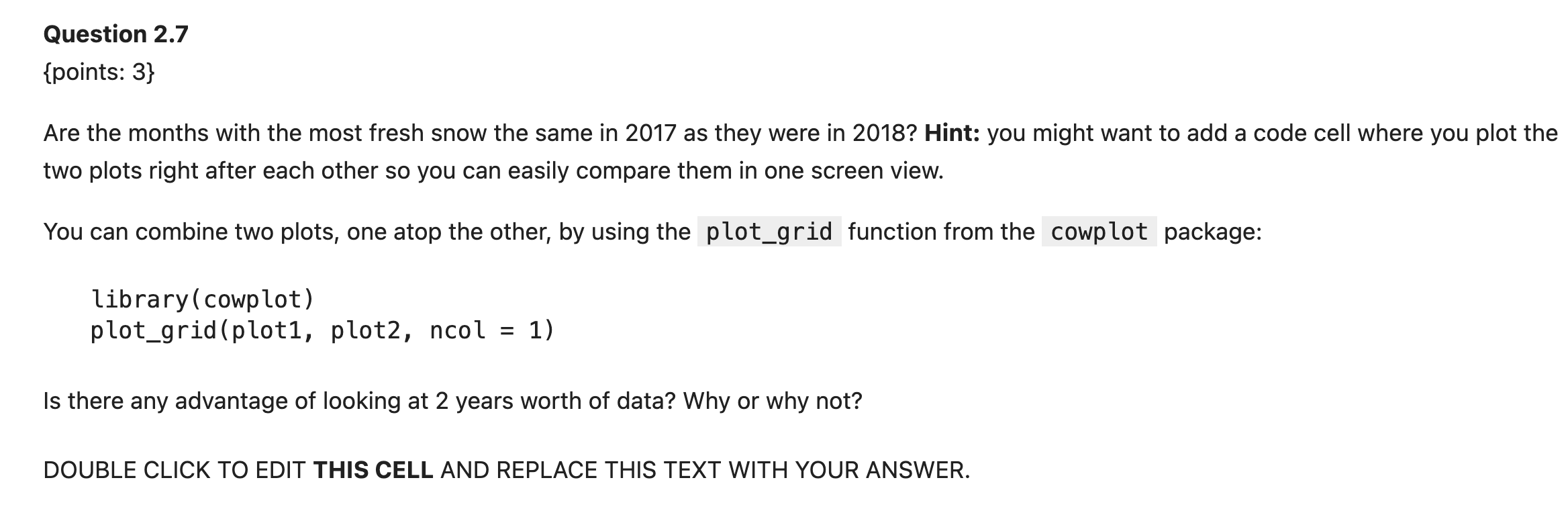
- Two questions, and the second one sits below the code hint. Count the question marks before you move on.
- Write your answer in the designated answer box.
Tutorial 2, Question 2.7
🚨 Correlation does not imply causation
Just because two things happen at the same time does not mean one causes the other.
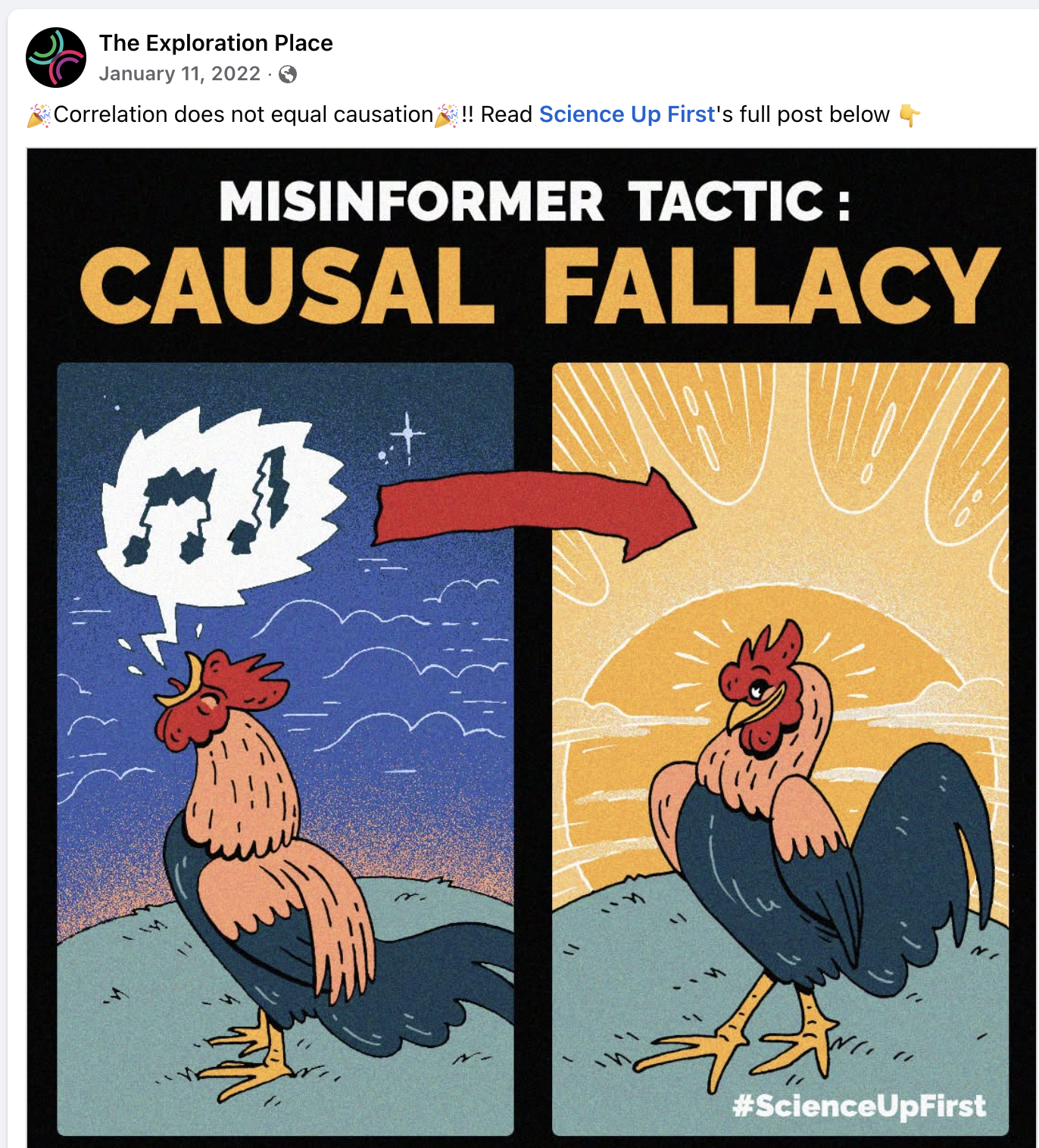
Source: The Exploration Place
Week 5: Version control
What is version control?
- Version control: the process of keeping a record of changes to documents, including when the changes were made and who made them
- lets you view earlier versions and revert changes
- facilitates resolving conflicting edits
- originally for software development, but is now used for many tasks (e.g. data analysis!)
Why do we need tools to help us collaborate?
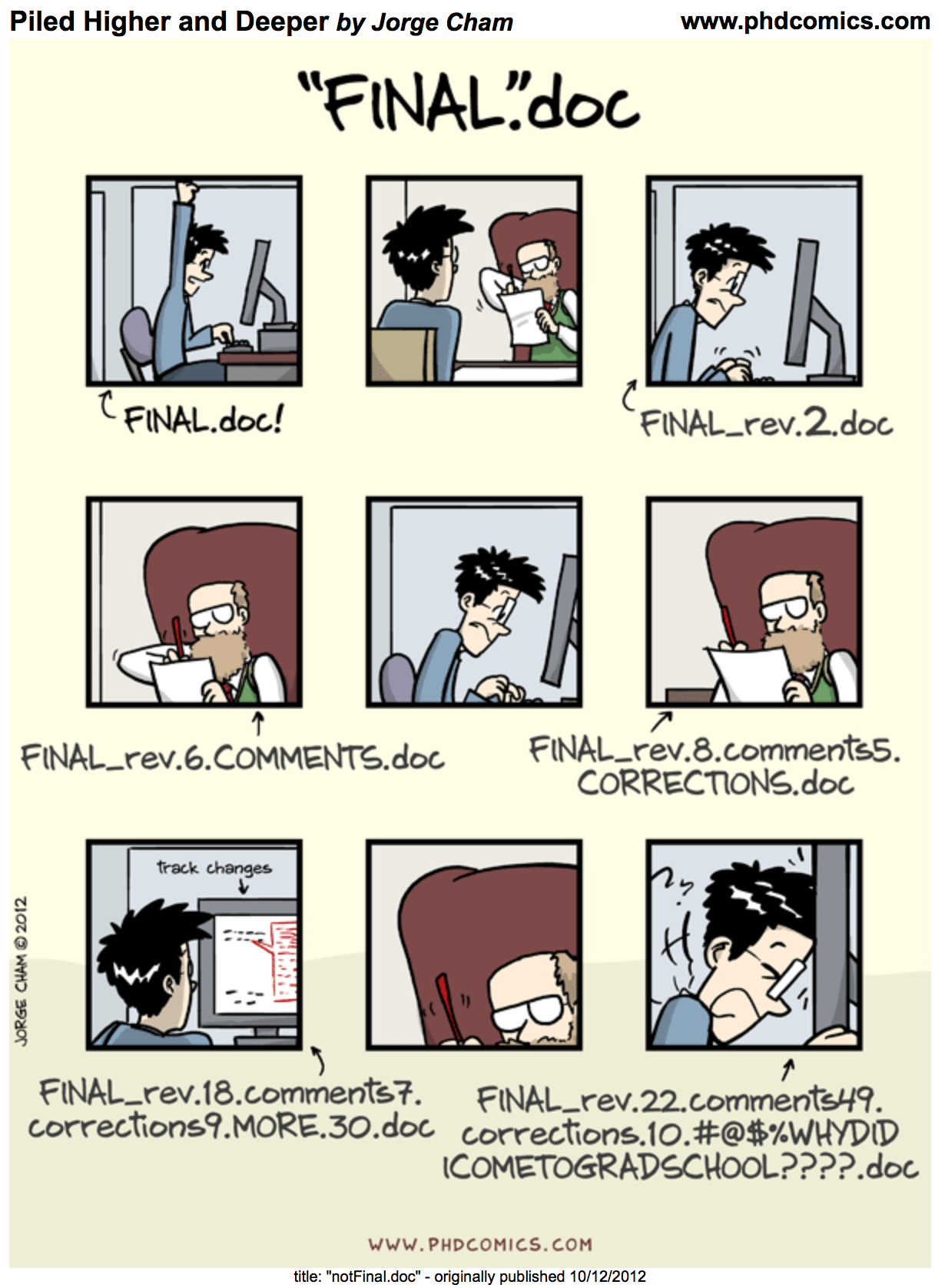
No big deal. Just send files to your teammates in emails. Right?
Why do we need tools to help us collaborate?
Problems with emailing as version control:
which version is the newest?
who made edits, when where they made?
what were you working on? (when you revisit the project 3 months from now)
can’t easily revert changes (if something breaks)
no sane way to discuss todo items, issues, etc.
Why do we need tools to help us collaborate?
OK, fine. Then let’s just share and edit files on dropbox/google drive. Right?
These solve only the problem of knowing which version is the newest
Still:
can’t tell who made edits, when they were made
can’t tell what you were working on when you revisit the project 3 months from now
can’t easily revert changes
no sane way to discuss todo items, issues, etc
(and honestly, you still usually end up with final_revision_v3_final.docx…)
Git and GitHub
In this course we use two major tools for version control

Git
Git is a version control system that:
Keeps track of files in a repository (a folder that you tell Git to pay attention to)
Tracks of changes
Shares files with others
Handles conflict resolution
Runs on your (and your teammates’) local machines (collaboration)
GitHub
GitHub is a cloud-based service that hosts your repository which:
Helps manage permissions (who can view your project, who can edit it)
Provides tools for project-specific communication (organized into issues)
Can be used to build and host websites/blogs
📸 add, commit, push, pull
Key version control concepts and commands
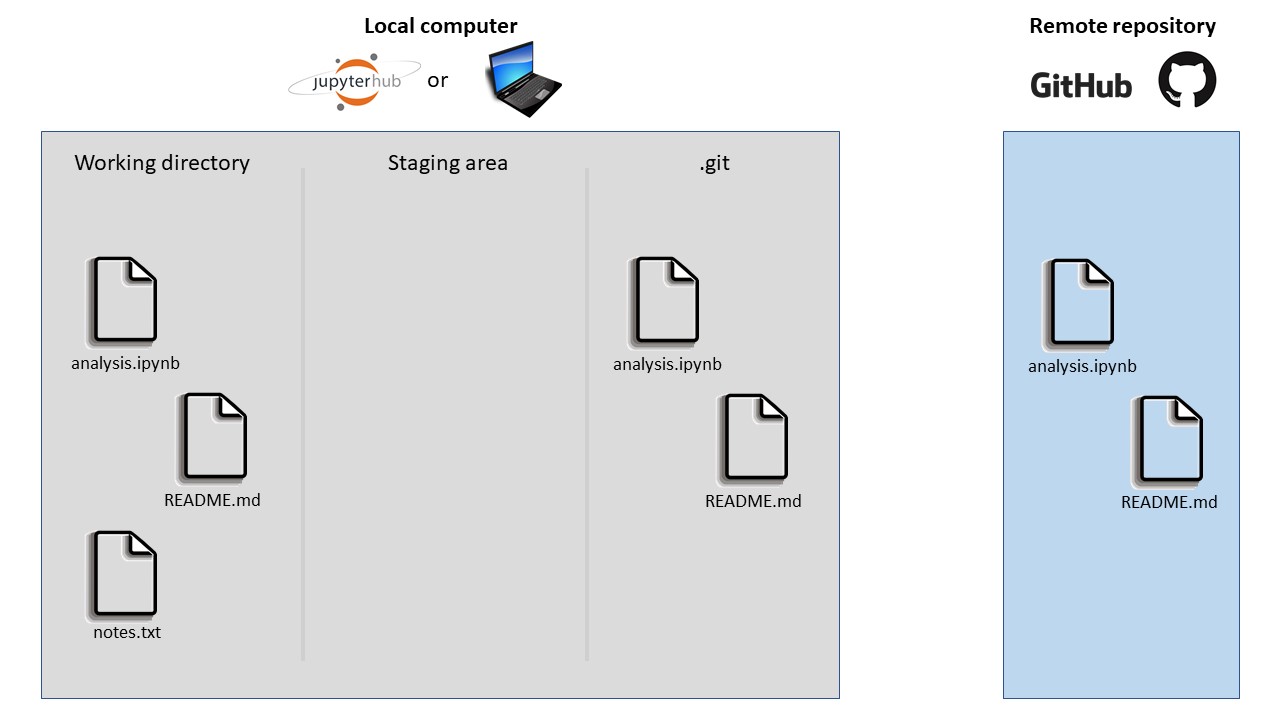
Notes:
Key version control concepts and commands
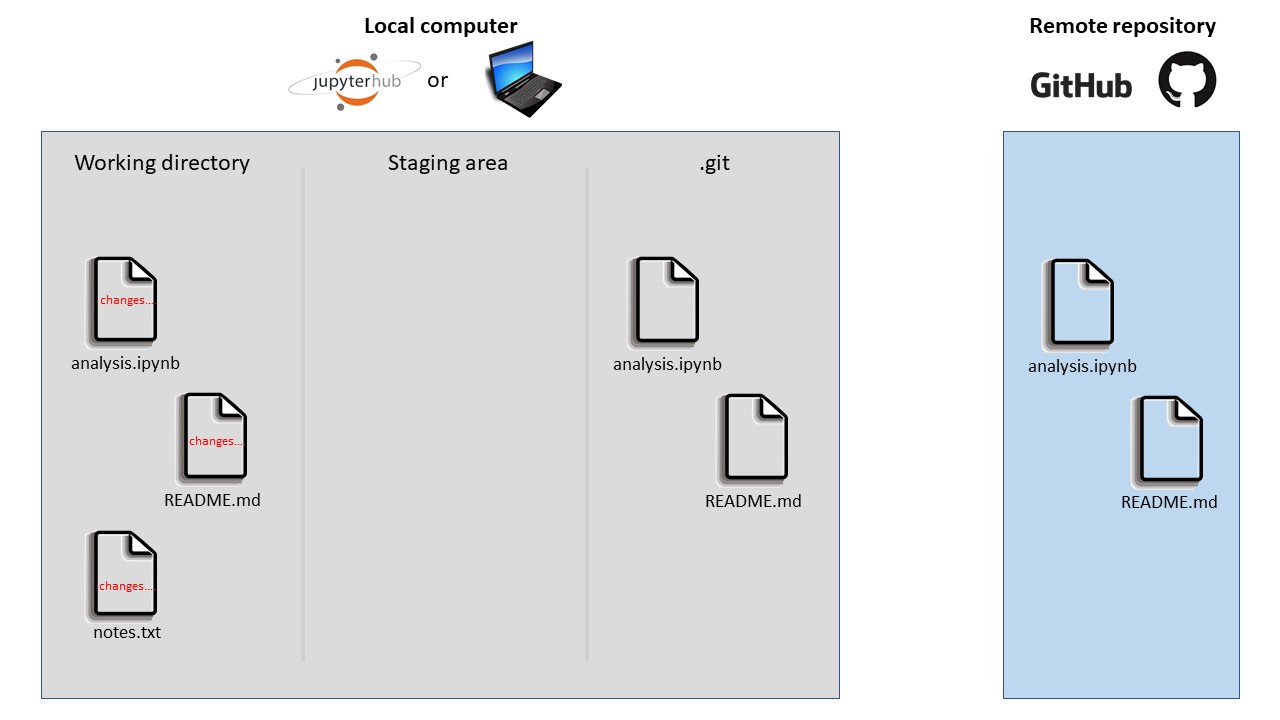
Notes:
Key version control concepts and commands
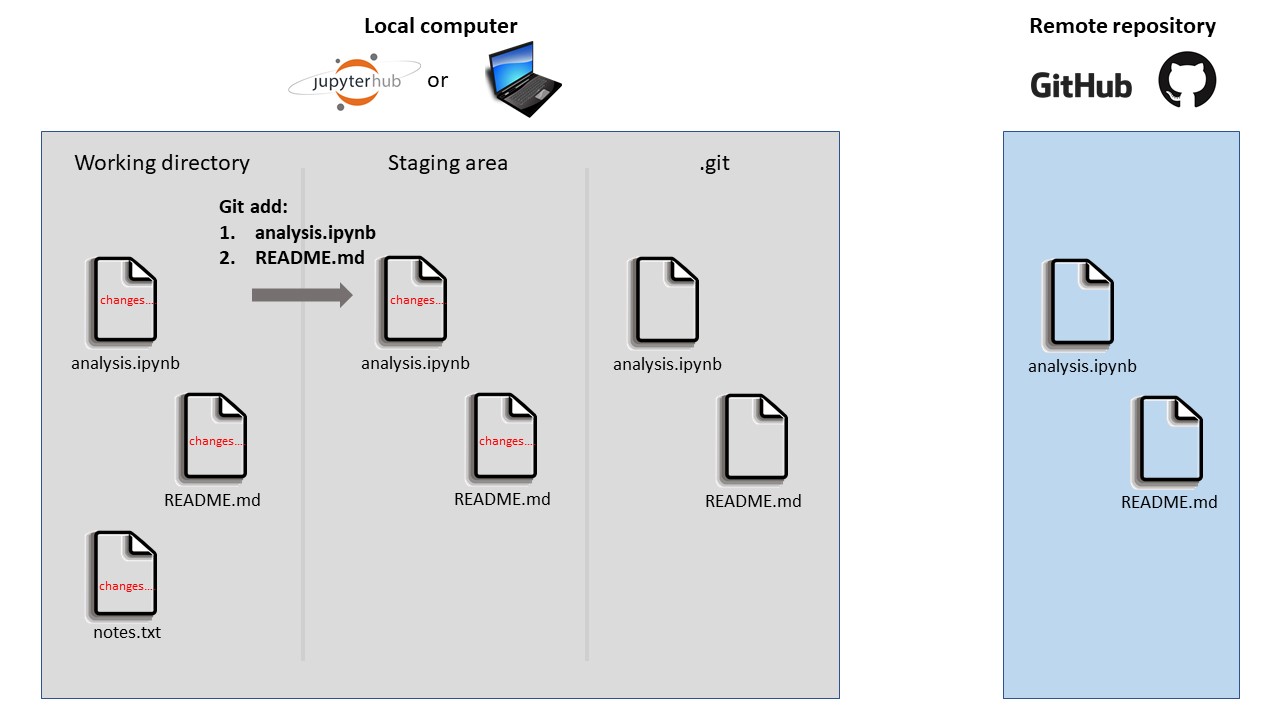
Notes:
Key version control concepts and commands
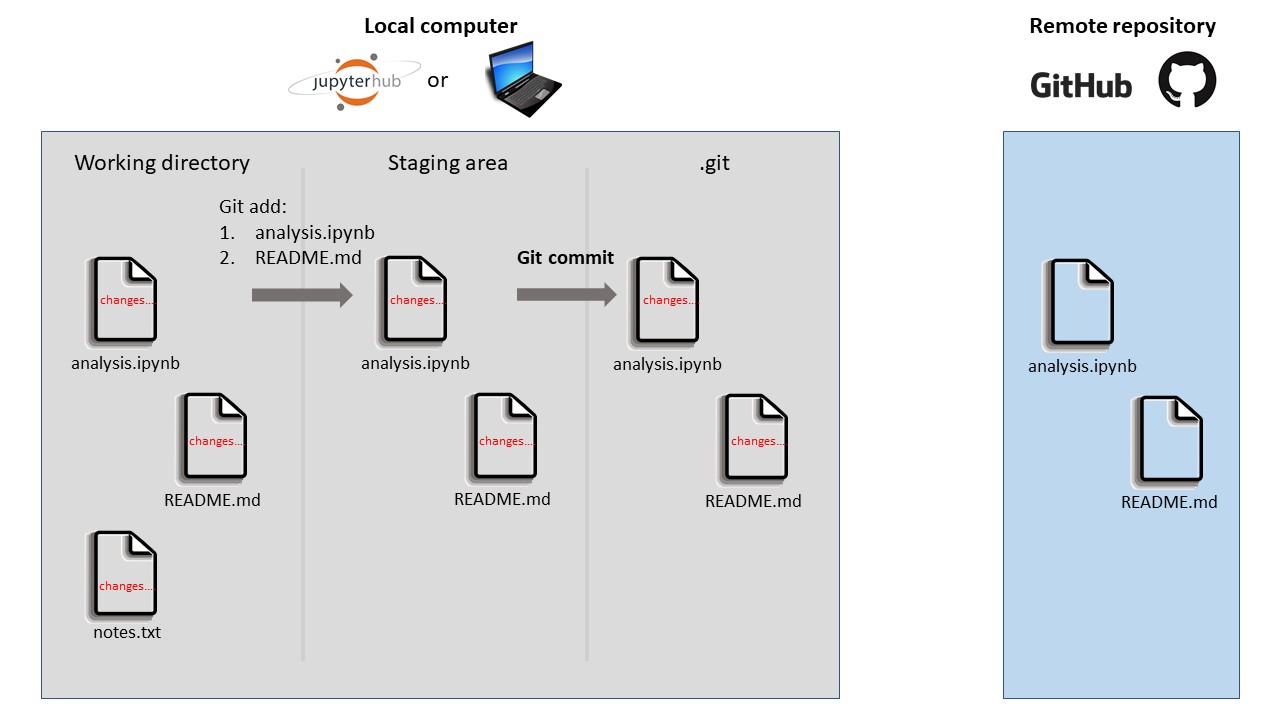
Notes:
Key version control concepts and commands
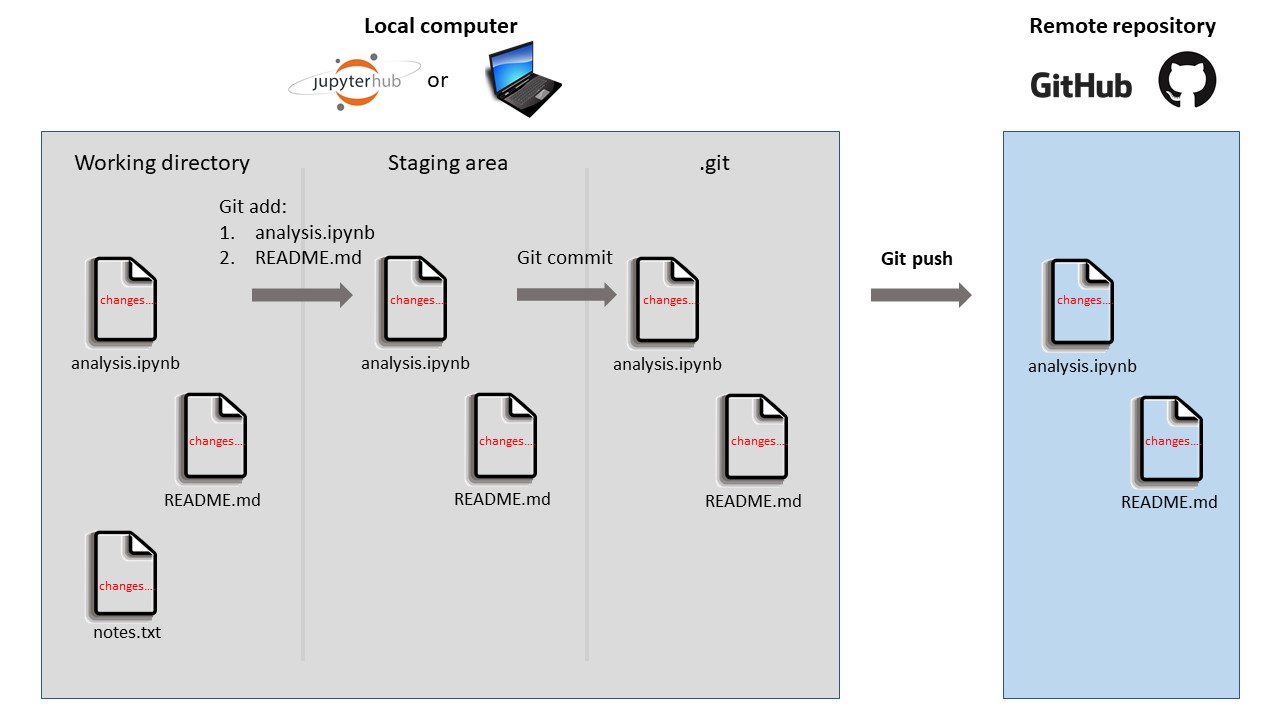
Notes:
Key version control concepts and commands
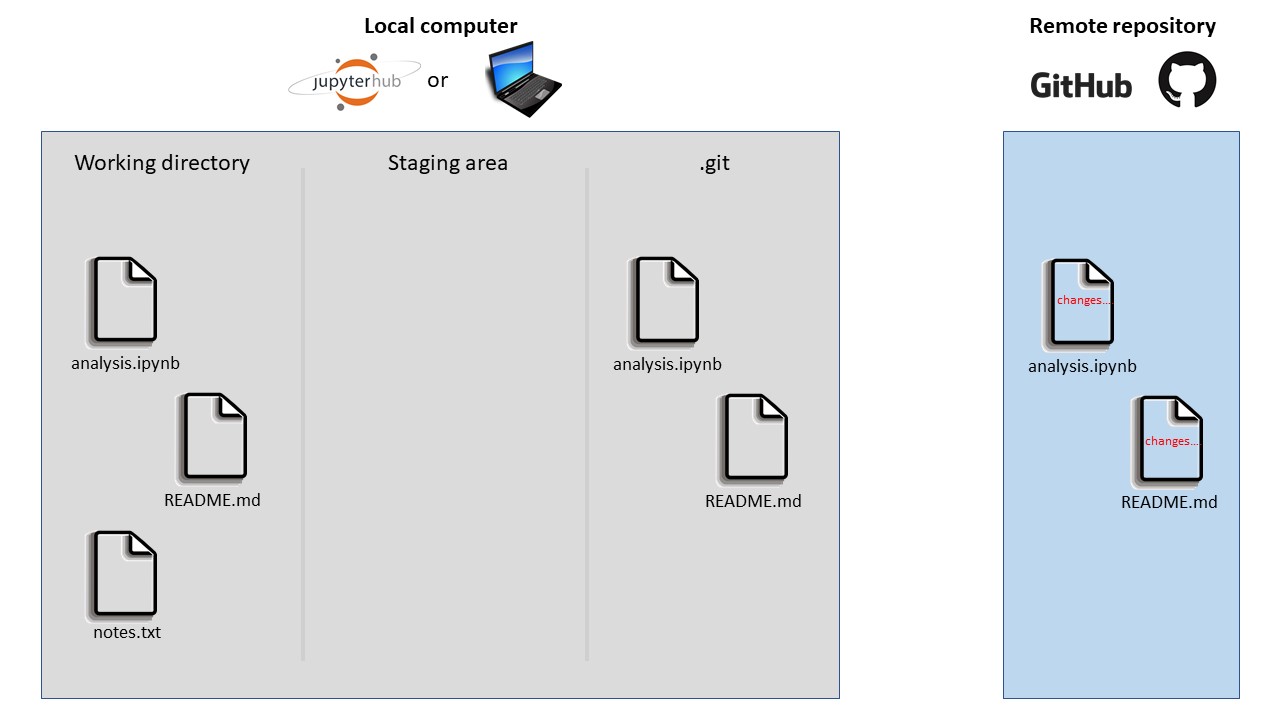
Notes:
Key version control concepts and commands
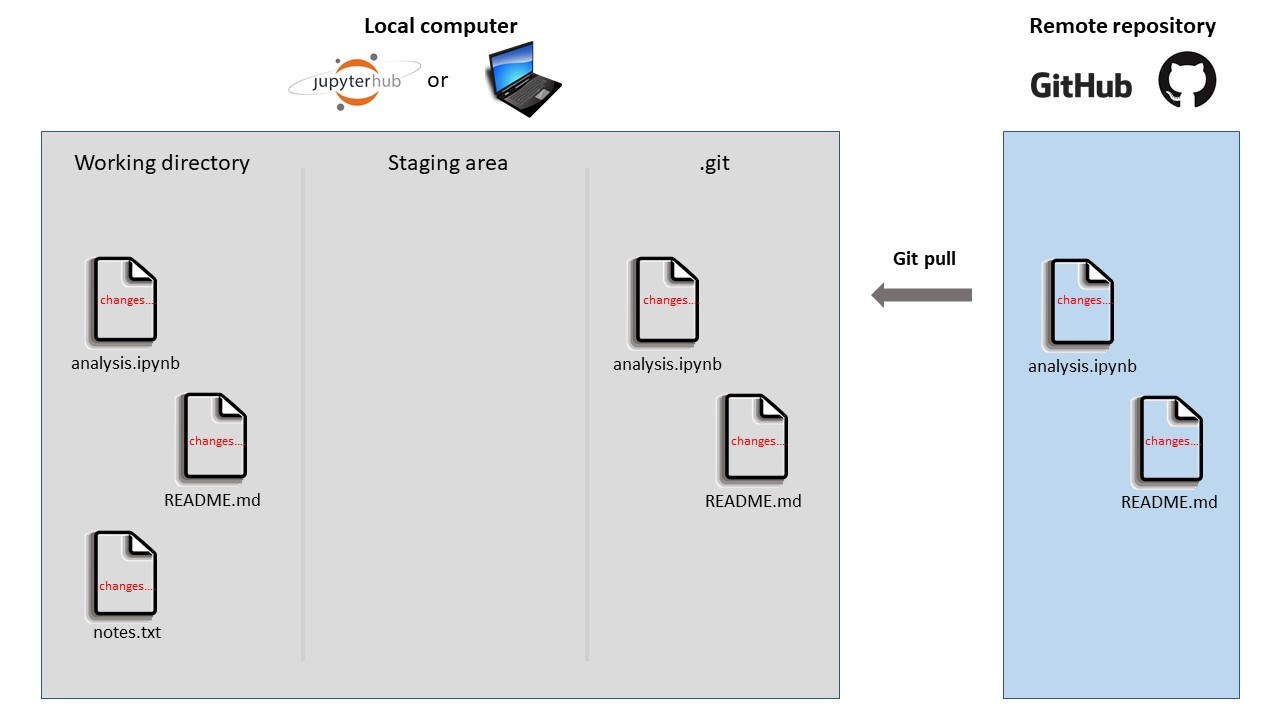
Notes:
📸 Where your work lives
viewof gp_step = {
  const n = transpose(gp_steps).length;
  const wrap = document.createElement("form");
  wrap.onsubmit = e => e.preventDefault();
  wrap.style = "display: flex; gap: 10px; align-items: center; margin-bottom: 6px;";
  const mk = label => {
    const b = document.createElement("button");
    b.type = "button";
    b.textContent = label;
    b.style = "font-size: 17px; padding: 3px 16px; border-radius: 6px; cursor: pointer;" +
              "border: 2px solid #2a78d6; background: #ffffff; color: #2a78d6;";
    return b;
  };
  const back = mk("← Back"), next = mk("Next →");
  const readout = document.createElement("span");
  readout.style = "font-size: 15px; color: #8a8880;";
  wrap.append(back, next, readout);
  const render = () => {
    readout.textContent = `Step ${wrap.value} of ${n - 1}`;
    for (const [b, off] of [[back, wrap.value === 0], [next, wrap.value === n - 1]]) {
      b.disabled = off;
      b.style.opacity = off ? 0.3 : 1;
      b.style.cursor = off ? "default" : "pointer";
    }
  };
  const go = d => {
    wrap.value = Math.min(n - 1, Math.max(0, wrap.value + d));
    render();
    wrap.dispatchEvent(new CustomEvent("input"));
  };
  back.onclick = () => go(-1);
  next.onclick = () => go(1);
  wrap.value = 0;
  render();
  return wrap;
}
gp_row = transpose(gp_steps).find(d => d.step === gp_step)
{
// Draw only. Boxes, items, colours, commands and captions came from R.
const items = transpose(gp_items).filter(d => d.step === gp_step);
const places = transpose(gp_places);
const zones = transpose(gp_zones);
// The whole instruction for this step, pinned above everything else.
const instructions = `
<div style="border: 2px solid ${gp_row.is_cmd ? "#2a78d6" : "#e4e3df"};
border-radius: 8px; background: #fcfcfb; padding: 6px 12px;
margin-bottom: 8px; min-height: 100px;">
<div style="display: flex; align-items: baseline; gap: 12px; flex-wrap: wrap;">
<span style="font-size: ${gp_row.is_cmd ? "20px" : "16px"};
font-weight: ${gp_row.is_cmd ? "bold" : "normal"};
font-family: ${gp_row.is_cmd ? "var(--r-code-font, monospace)" : "inherit"};
color: ${gp_row.is_cmd ? "#2a78d6" : "#b8b6b0"};">${gp_row.headline}</span>
</div>
<div style="font-size: 13px; color: #8a8880; min-height: 18px;">${gp_row.jupyter || " "}</div>
<div style="font-size: 16px; color: #52514e; margin-top: 2px;">${gp_row.caption}</div>
</div>`;
const chip = cmd => {
const on = gp_row.active === cmd.key;
return `<div style="border: 2px solid ${on ? "#2a78d6" : "#e4e3df"};
background: ${on ? "#2a78d6" : "#ffffff"};
color: ${on ? "#ffffff" : "#b8b6b0"};
font-weight: ${on ? "bold" : "normal"};
border-radius: 13px; padding: 1px 0; margin: 2px 0; text-align: center;
font-size: 13px; white-space: nowrap;">${cmd.text}</div>`;
};
// One box: a place inside a container, with whatever sits in it this step.
const box = p => `
<div style="grid-row: 1; grid-column: ${p.col}; border: 2px ${p.dashed ? "dashed" : "solid"} #d9d8d4;
border-radius: 8px; padding: 5px 6px; background: #ffffff;">
<div style="font-size: 14px; font-weight: bold; color: #52514e;
line-height: 1.2;">${p.icon} ${p.title}</div>
<div style="font-size: 11px; color: #8a8880; line-height: 1.25;
min-height: 28px;">${p.blurb}</div>
${items.filter(d => d.place === p.place).map(d => `
<div class="cell-box ${d.css}" style="display: block; height: auto;
min-height: 0; min-width: 0; margin: 4px 0; padding: 3px 4px;
font-size: 11px; line-height: 1.25; text-align: center;">${d.label}${
d.meta ? `<div style="font-size: 10px; opacity: 0.75;">${d.meta}</div>` : ""
}</div>`).join("")}
</div>`;
const header = z => `
<div style="margin-bottom: 5px;">
<span style="font-size: 13px; color: #8a8880;">${z.heading}</span>
<span style="font-size: 15px; font-weight: bold; color: #52514e;
margin-left: 6px;">${z.subtitle}</span>
</div>`;
// The local project folder: a real folder on your laptop that holds all three.
const inner = gp_row.folder
? `<div style="display: grid; grid-template-columns: 1fr 64px 1fr 64px 1fr;
align-items: start;">
${places.filter(p => p.zone === "folder").map(box).join("")}
<div style="grid-row: 1; grid-column: 2; align-self: center;">${chip({key: "add", text: "add →"})}</div>
<div style="grid-row: 1; grid-column: 4; align-self: center;">${chip({key: "commit", text: "commit →"})}</div>
</div>`
: `<div style="display: flex; align-items: center; justify-content: center;
min-height: 150px; font-size: 15px; color: #b8b6b0;">${gp_row.folder_note}</div>`;
const folderZone = `
<div style="grid-column: 1; border: 2px ${gp_row.folder ? "solid #52514e" : "dashed #d9d8d4"};
border-radius: 10px; padding: 7px 9px; background: #f7f7f5;">
${header(zones[0])}${inner}
</div>`;
const remoteZone = `
<div style="grid-column: 3; border: 2px solid #52514e; border-radius: 10px;
padding: 7px 9px; background: #f7f7f5;">
${header(zones[1])}
<div style="display: grid; grid-template-columns: 1fr; row-gap: 6px;">
${places.filter(p => p.zone === "remote").map((p, i) =>
box(p).replace("grid-row: 1;", `grid-row: ${i + 1};`)).join("")}
</div>
</div>`;
const key = l => `
<span style="display: inline-flex; align-items: center; gap: 4px; margin: 0 7px;">
<span class="cell-box ${l.css}" style="width: 13px; min-width: 0; height: 13px;
padding: 0; border-radius: 3px;"></span>${l.label}</span>`;
const div = document.createElement("div");
div.innerHTML = instructions + `
<div style="display: grid; grid-template-columns: 1fr 74px 215px; align-items: start;">
${folderZone}
<div style="grid-column: 2; align-self: center;">
${chip({key: "clone", text: "← clone"})}
${chip({key: "push", text: "push →"})}
${chip({key: "pull", text: "← pull"})}
</div>
${remoteZone}
</div>
<div class="ds-caption" style="font-size: 12px; margin-top: 4px;">${transpose(gp_legend).map(key).join("")}</div>`;
return div;
}⏪ Time travel through your history
{
  // Draw only: the log, the file lines and the new-line flags were prepared in R.
  const log = transpose(tt_log).map(d => `
    <div style="padding: 4px 8px; margin: 3px 0; border-radius: 6px; font-size: 15px;
        background: ${d.commit === tt_commit ? "#2a78d6" : "transparent"};
        color: ${d.commit === tt_commit ? "#ffffff" : d.commit > tt_commit ? "#b8b6b0" : "#52514e"};">
      <code style="color: inherit;">${d.hash}</code> ${d.author}, ${d.when}<br>${d[tt_style]}
    </div>`).join("");
  const lines = transpose(tt_lines).filter(d => d.commit === tt_commit).map(d => `
    <span style="display: block; padding-left: 6px; min-height: 1.3em;
        border-left: 4px solid ${d.is_new ? "#eb6834" : "transparent"};">${d.text}</span>`).join("");
  const div = document.createElement("div");
  div.innerHTML = `
    <div style="display: flex; gap: 16px;">
      <div style="flex: 0 0 34%;">
        <div style="font-weight: bold; font-size: 17px; color: #52514e;">History (newest on top)</div>
        ${log}
      </div>
      <div style="flex: 1; min-width: 0;">
        <div style="font-weight: bold; font-size: 17px; color: #52514e;">analysis.ipynb at this commit</div>
        <pre style="font-size: 13px; line-height: 1.35; white-space: pre-wrap;"><code>${lines}</code></pre>
        <div class="ds-caption" style="text-align: left;">Orange bar: lines this commit added or changed.</div>
      </div>
    </div>`;
  return div;
}
Three months later, your plot looks wrong. With lazy messages, which commit do you go back to?
Git clone: create a local copy of the remote repository on GitHub
Before you can add, commit, push or pull, you need the repository on your computer.
- clone: copy a repository from GitHub to your computer, with its full history and the address of GitHub.
- Do it once per computer. After that, use pull to get new snapshots.
- ⚠️ Download ZIP is not the same: you get the files, but no history and no link back to GitHub, so you can’t push.
📋 Your course project
Here are the instructions for the course project: Course Project, also in the menu at the top of this site.
Demo time!
Let’s get a repository made for our projects. Follow along!
📅 Upcoming Due Dates
worksheet_version_controldue SATURDAY, Oct 10, 11:59pm- Project up to Checkpoint A due SATURDAY, Oct 10, 11:59pm
- No tutorial assignment this week
Important
- You must submit your repository URL to Canvas!
- Test out the Lockdown Browser on Canvas by completing the iphone_poll quiz.