11 Branching workflows: GitHub flow and Git flow
Learning Objectives
- Explain the two most common Git branching strategies (Git flow and GitHub flow) and list their advantages and disadvantages.
Branching generally works well if a team agrees to and follows a consistent workflow. The two leading workflows used in industry are Git flow and GitHub flow. We will describe and discuss both here so you are aware of both, and we will employ GitHub flow in our projects for this course.
11.1 GitHub Flow
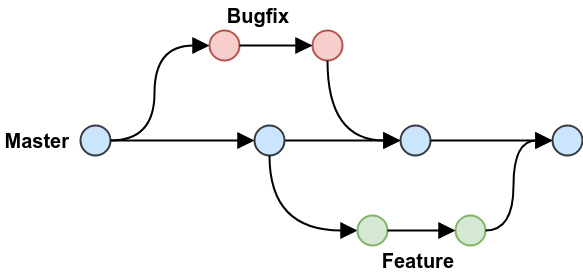
Key features: - A single “main” branch that also serves as the deployment branch, we call this main. - Every new contribution is done on a new branch (with a meaningful name) created from main. - Contributions from that new branch are sent back to main by means of a pull request, which ideally is reviewed & tested before merging.
(note: at the time this figure was made, the default branch on GitHub as still called the master branch)
11.2 Git Flow
Key features: - Two “main” branches that last forever, main for deployment and develop where things are tested before they are released to main. - Three supporting branches: feature, release & hotfix. Both feature & release branches are created from develop. feature branches should be merged into develop before they are incorporated into a release. release branches eventually get merged into main after adequate review and testing.
(note: at the time this figure was made, the default branch on GitHub as still called the master branch)
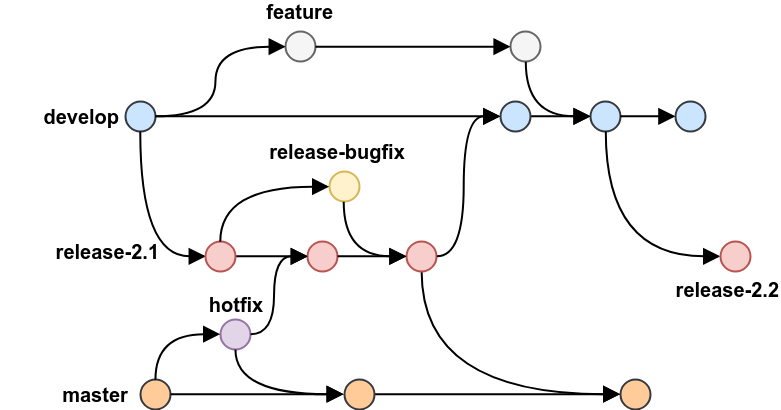
Source: https://blog.programster.org/git-workflows
What do you think are pros & cons of each of these branching workflows?
- You will be expected to work using the GitHub flow workflow for your projects in this course.